Freshness
A conversation you join in the first fifteen minutes is a different conversation from one you join three hours late. Freshness is the heaviest signal for exactly that reason.
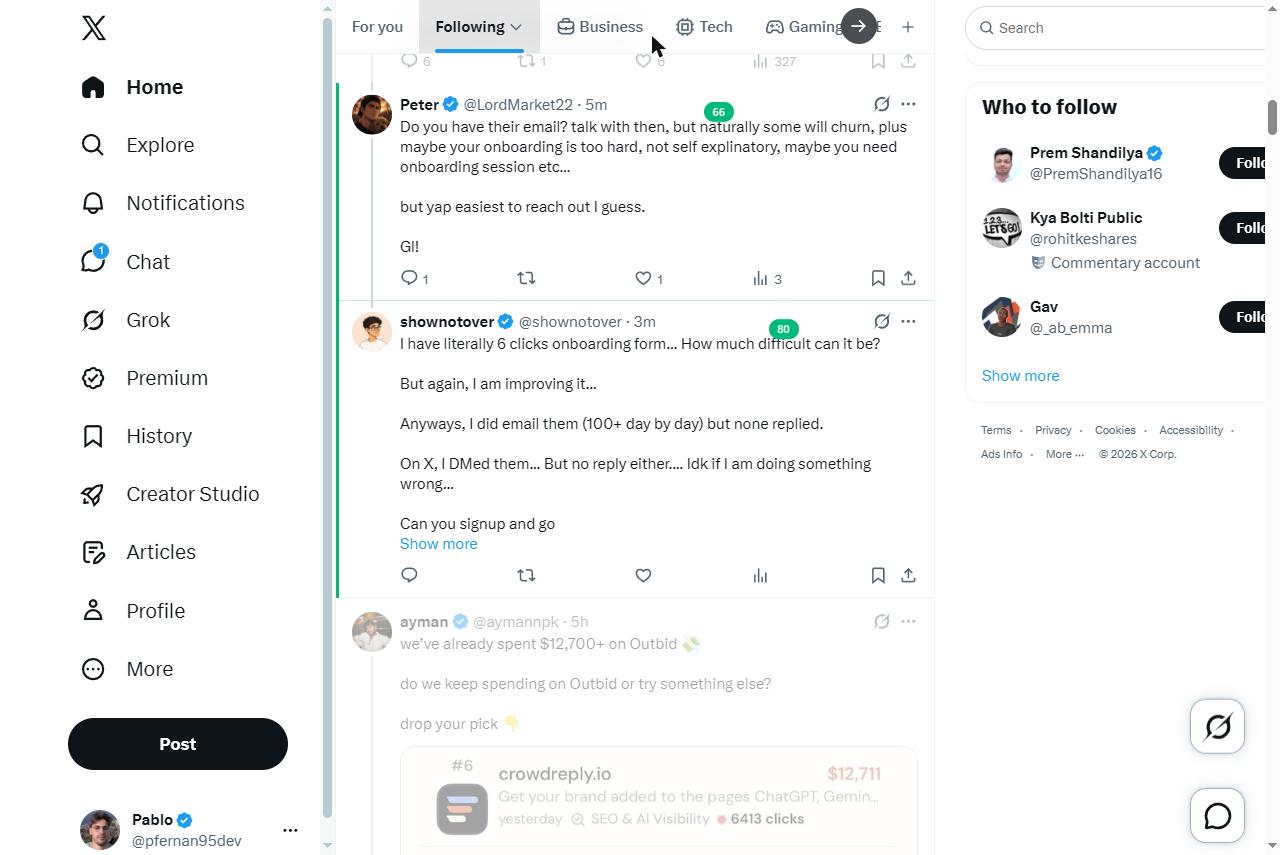
Winnow scores every post in your timeline as you scroll and highlights the few worth replying to. The rest fade out. No AI, no automation, no login — just arithmetic running in your browser.


From replying to the right posts, not posting more of them — straight from X's own analytics.
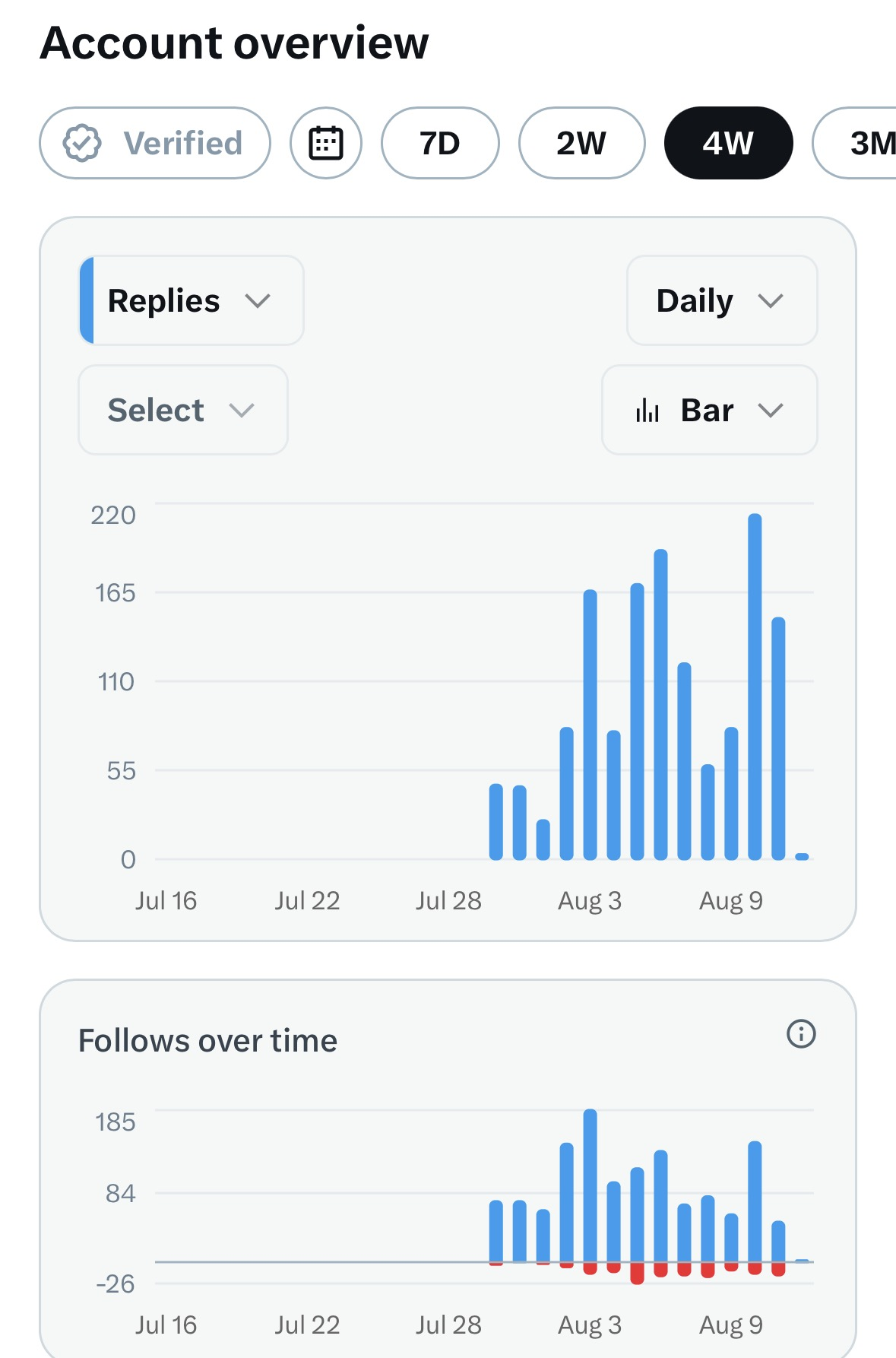
I used to reply to whatever showed up on the timeline — usually posts that were already ten replies deep, or three hours cold by the time I got to them. No structure to it, just scrolling and guessing.
Once I started scoring for freshness and headroom instead of scrolling for it, the same amount of typing turned into 1,700 followers in three weeks — starting from zero. Same replies, just aimed at posts that were actually still open.
Replying well on X is mostly a timing problem. The same reply is worth a great deal in the first fifteen minutes of a post with room left in it, and almost nothing on a post that already has forty replies and has finished being read. You cannot judge that by scrolling, because scrolling shows you popularity, which is the opposite signal.
So Winnow computes it. Age, views, replies, your keywords. Three numbers, one score, and a green edge on the handful that are worth your words.
A couple of threads from along the way:
Shipped a paywall with @RevenueCat and had no idea what it was actually doing until I put @posthog in front of it. Some things I learned wiring the two together 🧵
🎯 A funnel step that converts at 100% isn't a step. Mine went cta_tapped → paywall_viewed, always 100%, every time — that's the same event logged twice, and it made the funnel look one stage healthier than it was.
Building a subscription business on Stripe? Some things I learned doing a full integration from scratch 🧵
In subscription data terms, the provider is the source of truth, not your database. Always re-fetch the subscription from Stripe before trusting its status — the cached copy in your DB is stale the moment it’s written.
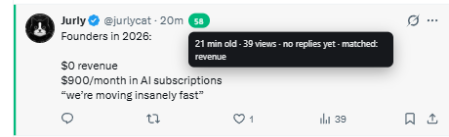
Every post gets 0–100. At or above your threshold it gets a coloured edge and a badge. Below it, it dims to 40%.
A conversation you join in the first fifteen minutes is a different conversation from one you join three hours late. Freshness is the heaviest signal for exactly that reason.
Lots of views and few replies means your reply gets read. A post already forty replies deep is a room nobody is listening in. Winnow scores the gap between attention and competition.
The fraction of your keywords in the post. You set them. There is no model deciding what you care about, which is why the score is the same every time.
These are constraints on how Winnow is built, not features waiting to be added.
Winnow is read-only. It does not post, reply, like, follow, or click anything on your behalf. It reads the page and marks it up.
No OAuth, no X API, no sign-in with X. It reads the page you are already looking at, in your own browser.
No analytics, no tracking, no server of ours. The only outbound request in the whole extension is validating your licence key, and it contains nothing but the key.
Scoring is local arithmetic. That is why it is instant, why it works offline, why it costs nothing to run, and why the same post always gets the same score.
Install it and pick the profile closest to what you write about. That fills in the keywords and thresholds, and Winnow starts scoring immediately — no configuration screen to grind through first.

Everything stays editable: keywords, a handle blacklist, maximum age, minimum views, maximum replies, and the score threshold. Changes apply to open tabs immediately, and the same profiles are one click away in settings.

$0
forever
$29 $23.20
one-time
LAUNCH20, applied automaticallyCheckout is handled by Lemon Squeezy, who email your licence key the moment you buy. Paste it into the extension's settings page and it activates. One payment. Updates included for as long as the extension exists.
Share your link, earn 30% of every sale it brings in — a one-time commission, since Winnow itself is a one-time purchase, not a subscription. Sign-up is instant, no approval wait.
Become an affiliateNo. Winnow is read-only and always will be. It never posts, replies, likes, follows, or clicks anything on your behalf — it adds a highlight and a score badge to posts already on your screen, and nothing else. It is a filter for deciding where to spend your own words.
No. There is no sign-in with X, no OAuth, and no use of the X API. Winnow reads the timeline you are already looking at, in your own browser, using your own session. It never sees your credentials because it never asks for them.
It gets fixed, and the update is included. Every selector Winnow uses lives in a single file, precisely so that a markup change is a one-file fix rather than a rewrite. X ships layout changes regularly; keeping up with them is the maintenance this is priced for. If something looks broken, email me and it will usually be out within a day or two.
Unlimited scanning and dimming — that's free at every tier, it's just local arithmetic. The free tier caps the part that's actually valuable: 5 highlighted hits a day, resetting at midnight your local time. Once those are used, a post that would have been the next hit is left completely untouched rather than dimmed — dimming it would misrepresent a score that really did clear your threshold.
One click. On install you pick one of four profiles — indie hacker, backend, mobile, or product design — and it fills in the keywords and thresholds for you. Prefer your own list? "Set up my own keywords" goes straight to that field instead. Either way, if you ever end up with none configured, the toolbar icon carries a reminder until you add some — relevance just doesn't do anything without them.
Nowhere. Your keywords, blacklist and settings are stored locally in the browser. Post content is read, scored, and discarded — it is never stored or transmitted. There is no analytics and no backend.
The home timeline, search results including the Latest tab, and community feeds.
You get a licence key by email the moment you buy. Paste it into the settings page and it activates. It is re-checked once a week, and if the licence server is ever down, Winnow keeps working — an outage on their end will not lock you out of software you paid for.
No. $29 is a one-time payment — no recurring charge, no trial that quietly turns into a subscription. Pay once, unlimited scoring for as long as the extension exists.
Yes, up to a small number of activations — enough for a laptop and a desktop, or a reinstall, without the key being something to share around. If you're switching machines and it won't activate, email me and I'll reset it.
The first fifteen minutes or so — after that, replies start filling up and yours gets buried instead of read. That's why freshness is the single heaviest signal in Winnow's score, worth 50% of it. You don't have to time it by hand; the score tells you which posts still have that window open.
Manually, you mostly can't — by the time a post looks popular enough to notice while scrolling, the window to get read has usually already closed. Winnow scores every post 0–100 on three things: how fresh it is, how much room is left (views relative to replies), and whether it matches your own keywords. The ones that clear your threshold get highlighted; the rest fade so you stop wasting time on them.
Yes — that's what Winnow is. It doesn't post or automate anything; it tells you which posts already on your screen are worth a reply, based on timing and headroom rather than follower count. Growth comes from replying well and often, not from the extension acting on your behalf.
It did for me — 1,700 followers in three weeks starting from zero, see the numbers above. The mechanism is simple: a reply on a fresh post with room left gets read by whoever is watching that post; a reply on a post already forty replies deep does not. Picking the right posts and doing it consistently matters more than any single reply going viral.